Self-hosted tool to disable WordPress scripts and styles
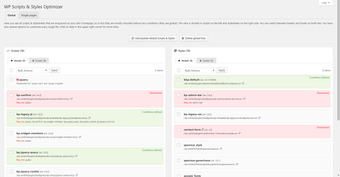
WP Scripts & Styles Optimizer, by Hendrik Lersch, is a WordPress plugin that reduces front-end bloat by preventing unneeded CSS and JavaScript from loading. The plugin gives site administrators direct control over which asset files load on individual pages or across the site, lowering HTTP requests and page weight. It targets WordPress site owners, developers, and SEO specialists who need targeted asset control to improve page speed metrics without editing theme files or plugin code.
It removes unnecessary front-end assets without altering source files
The plugin operates by stopping selected scripts and styles from being sent to the browser rather than deleting files, a non-destructive approach that preserves server files. Detected assets appear in a management interface for review, and administrators can apply rules so specific files do not enqueue on pages where they are not required. This method reduces the number of HTTP requests and the total page weight, which helps improve Core Web Vitals.
It gives fine-grained control over where assets run
The tool supports per-page and per-post controls plus site-wide deactivation, enabling precise targeting of front-end resources. It also handles assets enqueued by themes and third-party plugins, and offers bulk actions to apply the same rule across many pages. These options let users keep plugins active while preventing only their front-end files from loading, reducing manual hook edits or custom code work.
It keeps backend overhead low and works with common caching tools
The plugin uses a lightweight architecture that does not add significant backend overhead, and it requires a modern self-hosted WordPress installation. It is compatible with caching and minification plugins such as WP Rocket and W3 Total Cache, and it does not remove files from the server. Administrators are advised to test changes in an incognito window after adjustments to confirm functionality on affected pages.
Practical option for focused front-end optimization
WP Scripts & Styles Optimizer is a practical option for site owners and developers who want targeted reduction of front-end bloat without editing theme code. Users must validate pages after disabling assets, since essential scripts can stop features from working. A useful workflow is to apply rules on a staging site or test set, then use bulk actions once behavior is confirmed in an incognito window.
Pros
Per-page and per-post disabling for precise asset control
Global asset management to deactivate files site-wide
Supports assets enqueued by themes and third-party plugins
Bulk actions speed up optimization on large sites
Cons
Disabling essential scripts can break page functionality
Requires careful testing after changes in an incognito window
Compatibility depends on themes using standard enqueue functions
Laws concerning the use of this software vary from country to country. We do not encourage or condone the use of this program if it is in violation of these laws. Softonic may receive a referral fee if you click or buy any of the products featured here.